Telia ACE can be integrated at two levels: real-time data and historical data.
Set up data source
To set up the Telia ACE integration with Board, simply follow these steps:
1. Go to Settings > Integrations
2. Click on Add integration > Select Telia ACE
3. Optionally, name the data source, e.g., if you have multiple data sources of the same type
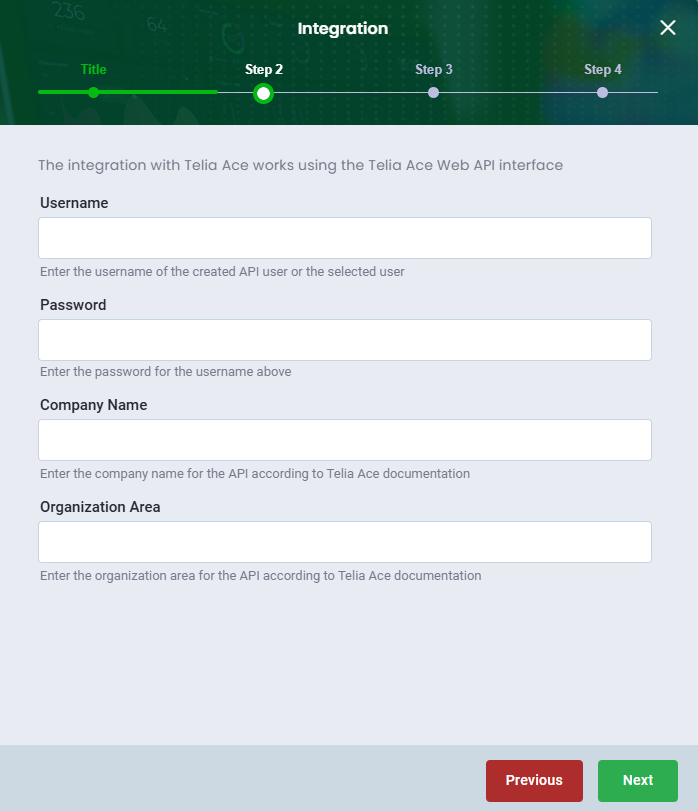
4. If you want to see real-time data, you will need access to your Telia ACE web API interface
a. Enter the username of the created API user or the selected user
b. Enter the password for the username above
c. Enter the company name for the API according to Telia ACE documentation
d. Enter the organization area for the API according to Telia ACE documentation
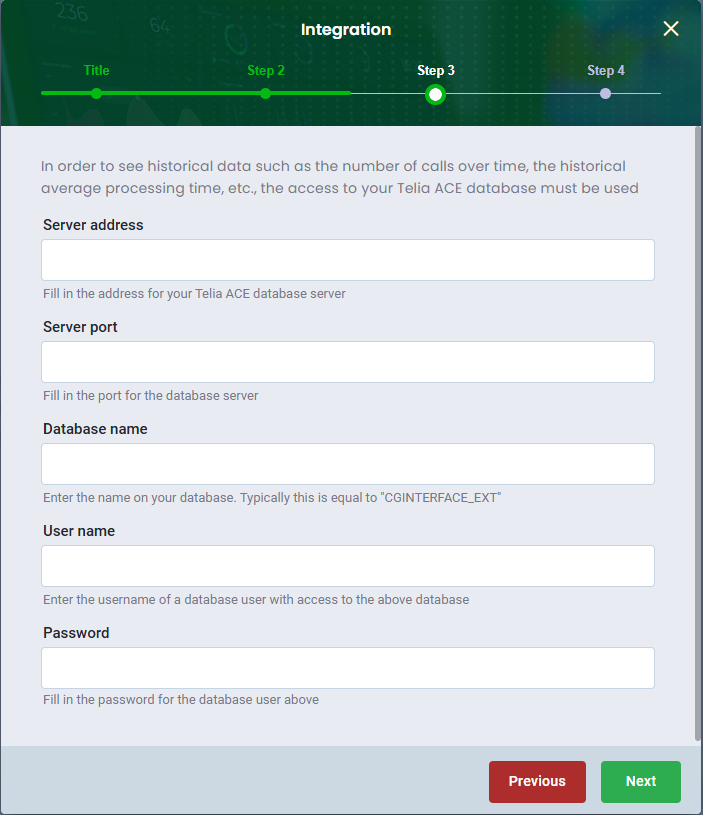
5. If you want to see historical data, you will need access to your Telia ACE database
- Fill in the adress for your Telia ACE database server
- Fill in the port for the database server
- Enter the name on your database. Typically this is eqaul to "CGINTERFACE_EXT"
- Enter the username of a database user with access to the above database
- Fill in the password for the database user above
6. Click Check credentials. If it returns green, the connection to the data is successful.
7. Finish by clicking Save
Was this article helpful?
That’s Great!
Thank you for your feedback
Sorry! We couldn't be helpful
Thank you for your feedback
Feedback sent
We appreciate your effort and will try to fix the article